# Pre-Setup Guide
{% stepper %}
{% step %}
### Download Microsoft VisualC++
1. [Visit this link](https://www.techpowerup.com/download/visual-c-redistributable-runtime-package-all-in-one/)
2. Download VisualC++ then extract the file. Right-click the file, then press **Extract**.
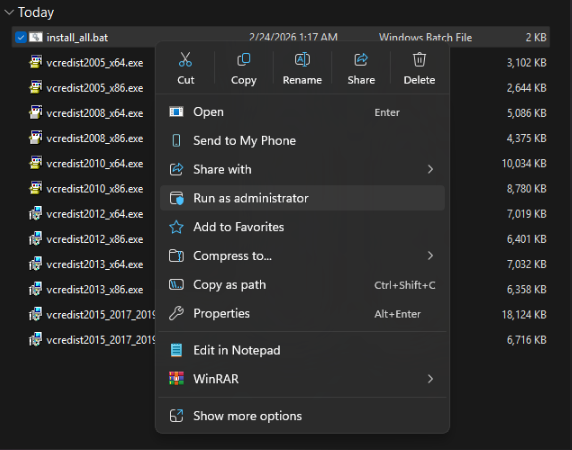
3. Run the `Install All` file as administrator.
{% endstep %}
{% step %}
### Disable Windows Defender
Why do I need to turn off anti virus?
Windows Security and third-party antivirus services will proactively block "injection" methods. This is a false-positive detection that must be resolved before proceeding.
1. Disable Virus & threat protection settings
1. Search `Virus & Threat Protection Settings` in your windows search bar.
2. Click "`Manage Settings`"
3. Disable all settings here, including `Real-time protection`.

2. Download and Install DControl
1. Download [WinRAR](https://www.win-rar.com/fileadmin/winrar-versions/winrar/winrar-x64-720.exe) and install it. This is required to extract `.rar` files.
2. Download [DControl](https://mega.nz/file/hBlikayL#yw6giPaLYe4RMVhjTd7nB2aJ9jzz4lwCvYRCTWupbDg).
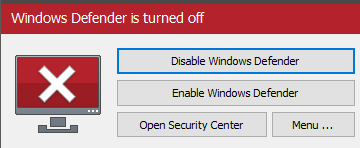
3. Open it and select `Disable Windows Defender`.
Why do I need to install DControl?
Windows Defender is designed to automatically re-enable itself after a restart or a period of inactivity. DControl (Windows Defender Control) permanently suppresses these security services to ensure they stay off, saving you the time of re-disabling them every session. It also provides a simple way to toggle protection back on whenever you choose.
{% endstep %}
{% step %}
### Remove Other Anti-Cheats
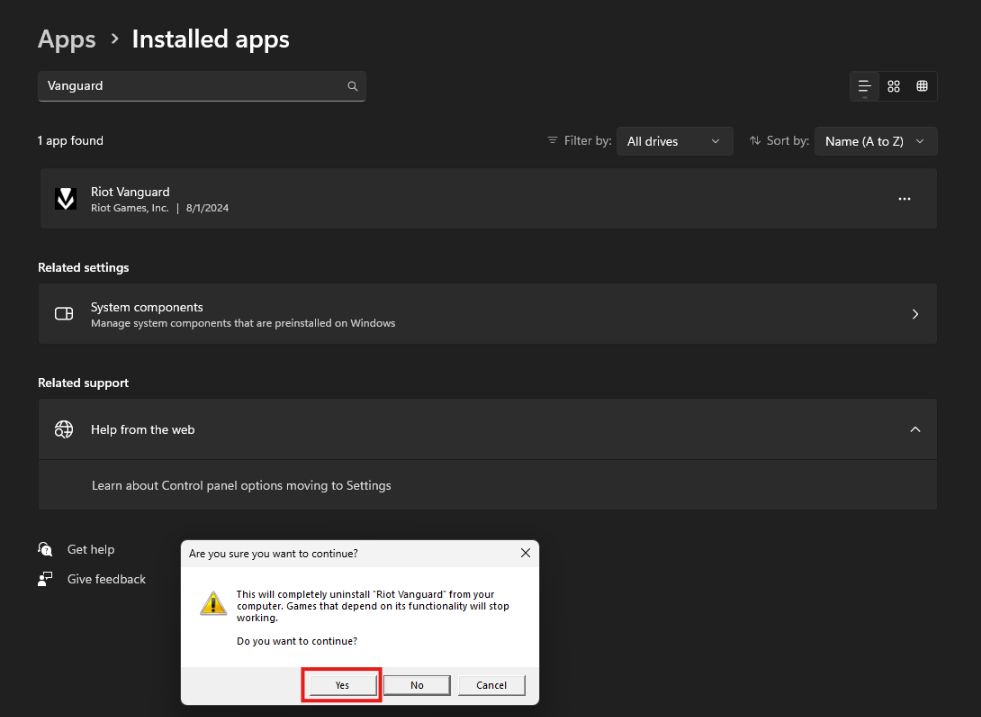
Uninstall the following if installed:
* FACEIT Anti-Cheat
* Vanguard (Valorant Anti-Cheat)
{% hint style="info" %}
If a product specifically requires one of these anti-cheats, you can keep it installed. It will be supported
{% endhint %}
{% endstep %}
{% step %}
### **Sync Date & Time**
* Right-click on the clock and click on Adjust date/time.
* Optionally, you can go to Start -> Settings -> Time & language -> Date & time.
* Under Synchronize your clock, click on Sync now.
[Direct link to Date & Time settings](ms-settings:dateandtime)
{% endstep %}
{% step %}
### Disable Core Isolation
* Download & install: [Here](https://cdn.discordapp.com/attachments/1368270037101842462/1489775960508334170/Turn_Core_Isolation_Memory_Integrity_OFF.reg?ex=69d1a57b\&is=69d053fb\&hm=59cc4be6881fdc610058128e0a4f98bc0b43df166cfae4af6cb723a4bc4b56f6&)
* Open It Then Click Yes Twice
{% endstep %}
{% step %}
### Microsoft .NET Framework
* Download & install: [Here](https://builds.dotnet.microsoft.com/dotnet/Sdk/10.0.201/dotnet-sdk-10.0.201-win-x64.exe)
* Download & install: [Here](https://download.microsoft.com/download/1/7/1/1718ccc4-6315-4d8e-9543-8e28a4e18c4c/dxwebsetup.exe)
{% endstep %}
{% endstepper %}